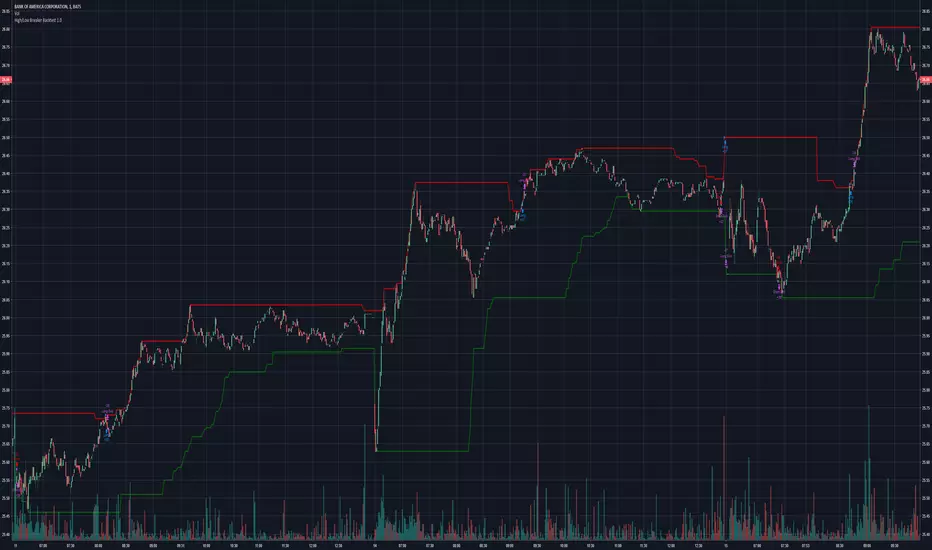
High/Low Breaker v2Specify Candles back to determine if high/low has been broken. Can choose to either calculate with source of high/low or close.Pine Script® indicatorby csreyes9251
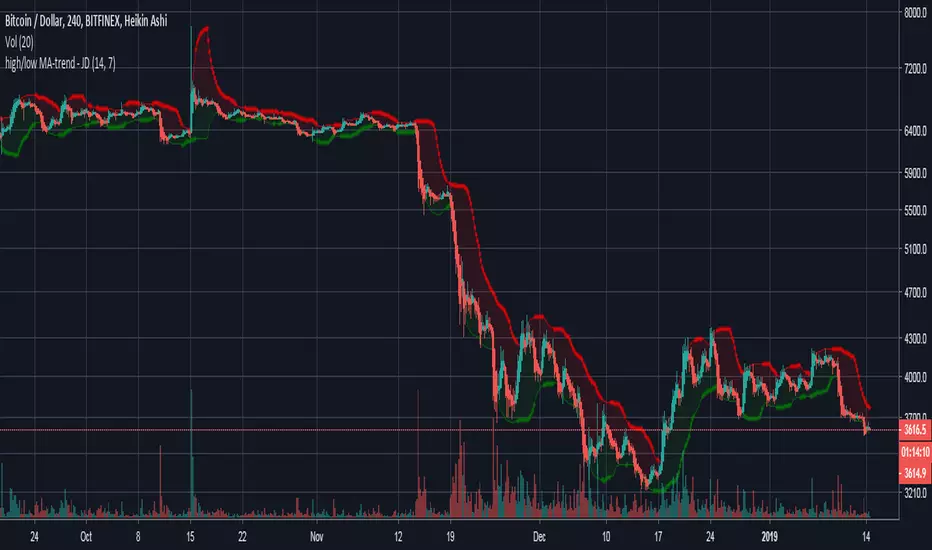
high/low MA-trend - JDShort script for trend indication taking a moving average of the highs and the lows seperately. Lookback period for the highs/lows can be altered. Ema length can be altered. JD.Pine Script® indicatorby DuyckUpdated 11193
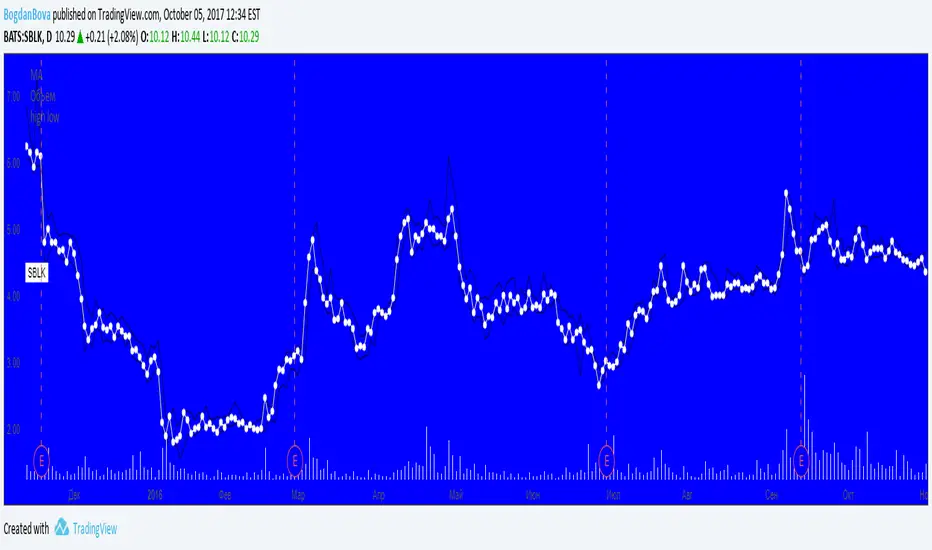
[M]HLC PlotsHLC Plots Draws points (lines) to high low and close. In some trading situations, this method is more convenient than candles or bars. -------------------------------------- Рисует точки(линии) по high low и close. В некоторых ситуациях торговли такой способ бывает удобней, чем свечи или бары. На вкус и цвет все фломастеры разные =) Pine Script® indicatorby Maga363
High/Low Digit SumNAMAN SHAH Its about the high low total of a candle only for gold where if highs total is 9 then its a chance that it will not break the high for a long time and it will be a good opportunity for short And vise versa Pine Script® indicatorby TERRAINVESTMENT0125
High Low LinesThis script allows you to see a line graph of the highs and lows. Useful for drawing trend lines.Pine Script® indicatorby rmunoz75
High Low with 3 timeframeshere is a high low indicator over 3 time framesPine Script® indicatorby hairmuch144
High/Low Premarket & Previous Day This scripts adds lines for previous day and premarket high/low with labels that you can toggle on and off. The lines extend through current premarket and trading sessionPine Script® indicatorby donnie_robersonjrUpdated 2275
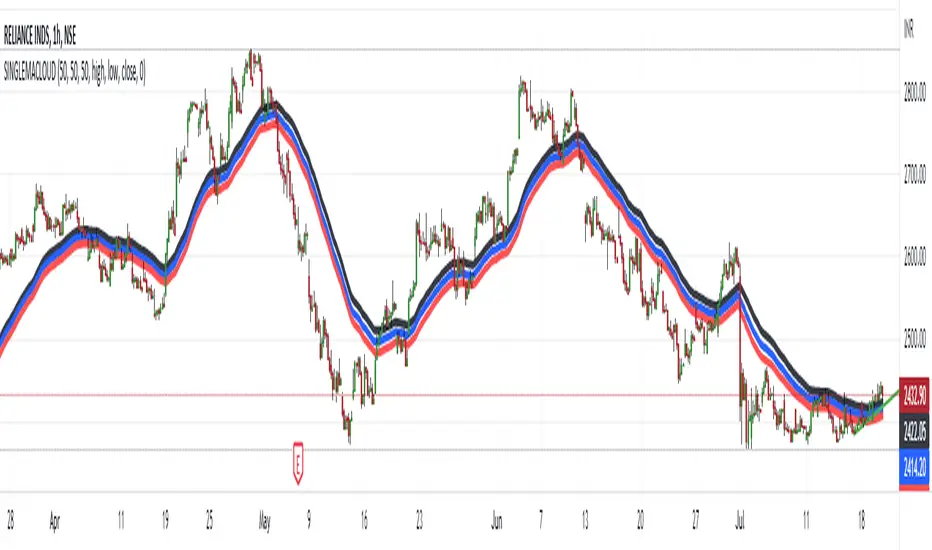
HIGH LOW CLOSE Moving Average ExponentialThe Script is prepared for testing purpose the Added single indicator for getting high low and close. Pine Script® indicatorby pankajkshirsagar2260
High Low Close YesterdayTake a trade based on yesterdays High, Low, ClosePine Script® indicatorby manojbhandwalkarUpdated 3391
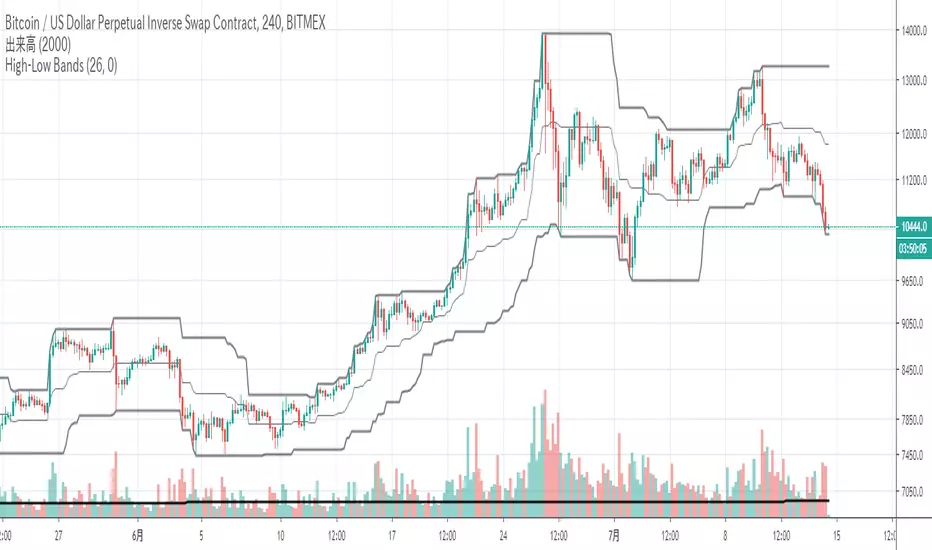
High Low BandsIt is just a high-low band. I published it because I could not find something good. ただのハイローバンドです。何故か良いのが見つからないので公開しました。Pine Script® indicatorby xinolia33268
High/Low Breaker Backtest 1.0Play with backtesting results from high/low breaker indicatorPine Script® strategyby csreyes9259
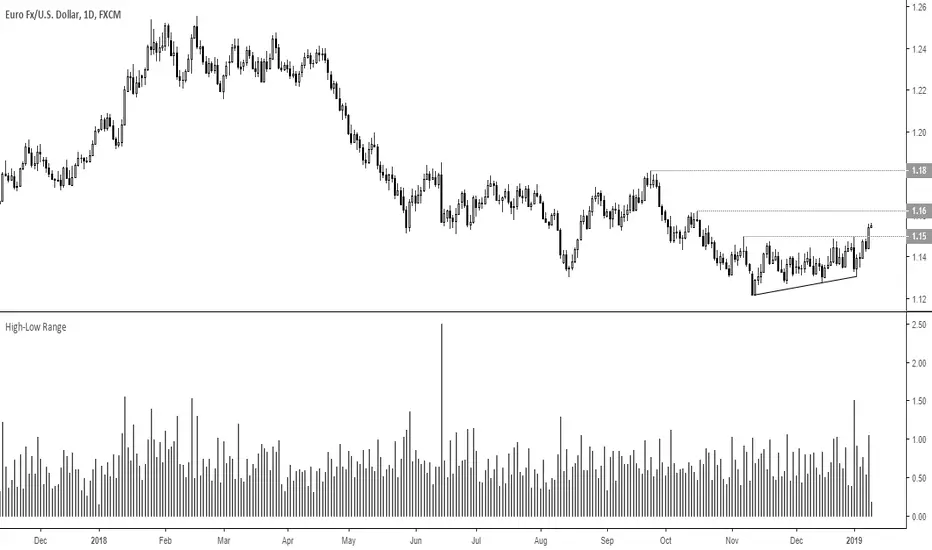
High-Low RangeMeasure high-low range of a single bar in percentage or pointsPine Script® indicatorby Matt_Simpson19
High - low Difference // ATR "LA TRADING"Simple Study between ATR and live High/Low difference Pine Script® indicatorby Trader_Laurent23
Unmitigated MTF High Low Pro - Cave Diving Bookmap Heatmap Plot Unmitigated MTF High Low Pro - Cave Diving Bookmap Heatmap Plot --- ## 📖 Table of Contents 1. (#what-this-indicator-does) 2. (#core-concepts) 3. (#visual-components) 4. (#the-cave-diving-framework) 5. (#how-to-use-it-for-trading) 6. (#settings--customization) 7. (#best-practices) 8. (#common-scenarios) --- ## What This Indicator Does The **Unmitigated MTF High Low v2.0** tracks unmitigated (untouch) high and low levels across multiple timeframes, helping you identify key support and resistance zones that the market hasn't revisited yet. Think of it as a sophisticated memory system for price action - it remembers where price has been, and more importantly, where it *hasn't been back to*. ### Why "Unmitigated" Matters In futures trading, especially on instruments like NQ and ES, the market has a tendency to revisit levels where liquidity was left behind. An "unmitigated" level is one that hasn't been touched since it was formed. These levels often act as magnets for price, and understanding their age and proximity gives you a significant edge in: - **Entry timing** - Waiting for price to approach tested levels - **Exit planning** - Taking profits before ancient resistance/support - **Risk management** - Avoiding entries when approaching multiple old levels - **Liquidity mapping** - Visualizing where orders likely cluster --- ## Core Concepts ### 1. **Sessions & Age** The indicator uses **New York trading sessions** (6:00 PM to 5:59 PM NY time) as the primary time measurement. This aligns with how futures markets naturally segment their activity. **Age Categories:** - 🟢 **New (0-1 sessions)** - Fresh levels, recently formed - 🟡 **Medium (2-3 sessions)** - Tested by time, gaining significance - 🔴 **Old (4-6 sessions)** - Highly significant, survived multiple days - 🟣 **Ancient (7+ sessions)** - Extreme significance, major support/resistance The longer a level remains unmitigated, the more significant it becomes. Think of it like compound interest - time adds weight to these zones. ### 2. **Multi-Timeframe Tracking** You can set the indicator to track high/low levels from any timeframe (default is 15 minutes). This means you're watching for unmitigated 15-minute highs and lows while trading on, say, a 1-minute or 5-minute chart. **Why this matters:** - Higher timeframe levels have more weight - You can see multiple timeframe structure simultaneously - Helps you avoid fighting larger timeframe momentum ### 3. **Mitigation** A level becomes "mitigated" (deactivated) when price touches it: - **High levels** are mitigated when price reaches or exceeds them - **Low levels** are mitigated when price reaches or goes below them Once mitigated, the level disappears from view. The indicator only shows you the untouch levels that still matter. --- ## Visual Components ### 📊 The Dashboard Table Located in the corner of your chart (configurable), the table shows: ``` ┌─────────┬───────────┬────────┬─────┬───────┐ │ Level │ Price │ Points │ Age │ % │ ├─────────┼───────────┼────────┼─────┼───────┤ │ ↑↑↑↑↑ │ 21,450.25 │ +45.50 │ 8 │ +0.21%│ ← 5th High (Ancient) │ ↑↑↑↑ │ 21,430.00 │ +25.25 │ 5 │ +0.12%│ ← 4th High (Old) │ ↑↑↑ │ 21,420.50 │ +15.75 │ 3 │ +0.07%│ ← 3rd High (Medium) │ ↑↑ │ 21,412.00 │ +7.25 │ 1 │ +0.03%│ ← 2nd High (New) │ ↑ ⚠️ │ 21,408.25 │ +3.50 │ 0 │ +0.02%│ ← 1st High (Proximity Alert!) ├─────────┼───────────┼────────┼─────┼───────┤ │ 15 mins │ 🟢 │ Δ 8.75 │ 2U │ │ ← Status Row ├─────────┼───────────┼────────┼─────┼───────┤ │ ↓ ⚠️ │ 21,399.50 │ -5.25 │ 0 │ -0.02%│ ← 1st Low (Proximity Alert!) │ ↓↓ │ 21,395.00 │ -9.75 │ 2 │ -0.05%│ ← 2nd Low (Medium) │ ↓↓↓ │ 21,385.25 │ -19.50 │ 4 │ -0.09%│ ← 3rd Low (Old) │ ↓↓↓↓ │ 21,370.00 │ -34.75 │ 6 │ -0.16%│ ← 4th Low (Old) │ ↓↓↓↓↓ │ 21,350.75 │ -54.00 │ 9 │ -0.25%│ ← 5th Low (Ancient) ├─────────┼───────────┼────────┼─────┼───────┤ │ 📊 15↑ / 12↓ │ ← Statistics (optional) └─────────┴───────────┴────────┴─────┴───────┘ ``` **Reading the Table:** - **Level Column**: Number of arrows indicates position (1-5), color shows age - **Price**: The actual price level - **Points**: Distance from current price (+ for highs, - for lows) - **Age**: Number of full sessions since creation - **%**: Percentage distance from current price - **⚠️**: Proximity alert - price is within threshold distance - **Status Row**: Shows timeframe, direction (🟢 bullish/🔴 bearish), tunnel width (Δ), and Strat pattern ### 📈 Visual Elements on Chart **1. Level Lines** - Horizontal lines showing each unmitigated level - **Color-coded by age**: Bright colors = new, darker = older, deep purple/teal = ancient - **Line style**: Customizable (solid, dashed, dotted) - Automatically turn **yellow** when price gets close (proximity alert) **2. Price Labels** - Show the exact price and age: "21,450.25 (8d)" - Fixed at small size for clean readability - Positioned with configurable offset from current bar **3. Bands (Optional)** - Shaded zones between pairs of unmitigated levels - Default: Between 1st and 2nd levels (the "tunnel") - Can switch to 1st-3rd, 2nd-3rd, or disable entirely - **Upper band** (pink/maroon) - Between unmitigated highs - **Lower band** (blue/teal) - Between unmitigated lows - These represent the "no man's land" or consolidation zones --- ## The Cave Diving Framework This indicator is designed around the **Cave Diving Trading Framework** - a psychological and technical approach that maps cave diving safety protocols to futures trading risk management. ### 🤿 The Core Metaphor **Cave diving has clear danger zones based on depth and overhead environment. Your trading should too.** #### Shallow Water (New Levels, 0-1 Sessions) - **Light**: Bright colors (bright red highs, bright green lows) - **Psychology**: Fresh territory, recently tested - **Trading**: Be aware but not overly concerned - **Cave Diving Parallel**: You can see the surface, easy exit #### Penetration Depth (Medium Levels, 2-3 Sessions) - **Light**: Medium intensity colors - **Psychology**: Building significance, market memory forming - **Trading**: Start respecting these levels for entries/exits - **Cave Diving Parallel**: Deeper in, need to track your line back #### Deep Dive Zone (Old Levels, 4-6 Sessions) - **Light**: Dark colors (deep maroon, dark blue) - **Psychology**: Highly tested support/resistance - **Trading**: Major decision points, plan accordingly - **Cave Diving Parallel**: Significant overhead, careful navigation required #### Overhead Environment (Ancient Levels, 7+ Sessions) - **Light**: Very dark, purple/deep teal - **Psychology**: Extreme caution required, major liquidity zones - **Trading**: These are your "turn back" signals - don't fight ancient levels - **Cave Diving Parallel**: Maximum danger, no room for error ### 🎯 The Proximity Alert System Just like a cave diver's depth gauge that warns at critical thresholds, the proximity alerts (⚠️) tell you when you're entering a danger zone. When price gets within your configured threshold (default 5 points), the indicator: - Highlights the level in **yellow** on the chart - Shows **⚠️** in the table - Signals: "You're entering a high-significance zone - adjust your position accordingly" This prevents the trading equivalent of going deeper into a cave without checking your air supply. --- ## How to Use It for Trading ### 🎯 Entry Strategies **1. The "Bounce Setup" (Mean Reversion)** - Wait for price to approach an old or ancient unmitigated level - Look for confluence: multiple levels nearby, bands narrowing - Enter when price shows rejection (reversal candle patterns) - **Example**: Price drops to a 6-session-old low, shows bullish engulfing → Long entry **2. The "Break and Retest" (Trend Following)** - Wait for price to break through an unmitigated level (mitigates it) - Enter on the retest of the newly broken level - **Example**: Price breaks above 4-session-old high → Wait for pullback to that level → Long entry **3. The "Tunnel Trade" (Range Trading)** - When bands are active, trade the range between 1st-2nd levels - Short near upper band resistance, long near lower band support - Exit at opposite side or when bands break ### 🚨 Risk Management Rules **The Ancient Level Rule** > Never fight ancient levels (7+ sessions). If you're long and approaching an ancient high, take profits. If you're short and approaching an ancient low, take profits. These levels have survived a full trading week without being touched - there's likely significant liquidity and institutional interest there. **The Proximity Exit Rule** > When you see ⚠️ proximity alerts on multiple levels above/below your position, tighten stops or scale out. This is your "overhead environment" warning. You're in dangerous territory. **The New Level Filter** > Be cautious taking positions based solely on new levels (0-1 sessions). Wait for them to age or combine with other confluence. Fresh levels haven't been tested by time. They're like unconfirmed support/resistance. ### 📊 Reading Market Structure **Bullish Structure (🟢 in status row)** - Unmitigated lows are aging and holding - Price respecting the lower band - Old lows below acting as strong support - **Bias**: Look for long entries at lower levels **Bearish Structure (🔴 in status row)** - Unmitigated highs are aging and holding - Price respecting the upper band - Old highs above acting as strong resistance - **Bias**: Look for short entries at higher levels **The Tunnel Compression** - When the Δ (delta) in the status row is small, levels are tight - This often precedes a breakout - **Trading**: Wait for breakout direction, then trade the break ### 🔄 Strat Integration The indicator shows Strat patterns in the status row: - **1** - Inside bar (consolidation) - **2U** - Broke high only (bullish) - **2D** - Broke low only (bearish) - **3** - Broke both (wide range, volatility) Use these with the unmitigated levels: - **2U near old high** → Potential resistance, watch for rejection - **2D near old low** → Potential support, watch for bounce - **3 pattern** → High volatility, respect wider stops --- ## Settings & Customization ### 📅 Session & Timeframe Settings **HL Interval** (Default: 15 minutes) - The timeframe for high/low calculation - **Lower (1m, 5m)**: More levels, more noise, good for scalping - **Higher (30m, 1H, 4H)**: Fewer levels, stronger significance, good for swing trading - **Recommendation for NQ/ES**: 15m or 30m for day trading, 1H for swing trading **Session Age Threshold** (Default: 2) - How many sessions before a level is considered "old" - Lower = more levels classified as old - Higher = stricter definition of significance ### 📊 Level Display Options **Show Level Lines** - Toggle: Display horizontal lines for each level - **Turn off** if you prefer a cleaner chart and only want the table **Show Level Labels** - Toggle: Display price labels on the chart - **Turn off** for minimal visual clutter **Label Offset** - Distance (in bars) from current price bar to place labels - Increase if labels overlap with price action **Level Line Width & Style** - Customize visual appearance - **Thin solid**: Minimal distraction - **Thick dashed**: High visibility ### 🎨 Age-Based Color Coding Customize colors for each age category (high and low separately): - **New (0-1 sessions)**: Default bright red/green - **Medium (2-3 sessions)**: Default medium intensity - **Old (4+ sessions)**: Default dark red/blue - **Ancient (7+ sessions)**: Default deep purple/teal **Color Strategy Tips:** - Keep ancient levels in highly contrasting colors - Use opacity (transparency) if you want subtler lines - Match your chart's color scheme for aesthetic coherence ### 🎯 Band Settings **Band Mode** - **1st-2nd** (Default): The primary "tunnel" between most recent levels - **1st-3rd**: Wider band, more room for price action - **2nd-3rd**: Band between less immediate levels - **Disabled**: No bands, lines only **Band Colors & Borders** - Customize fill color and border separately - **Tip**: Keep bands very transparent (90-95% transparency) to avoid obscuring price action ### ⚠️ Proximity Alert Settings **Enable Proximity Alerts** - Toggle: Turn on/off the warning system - When enabled, levels within threshold distance show ⚠️ and turn yellow **Alert Threshold** (Default: 5.0 points) - Distance in points to trigger the alert - **For NQ**: 5-10 points is reasonable - **For ES**: 2-5 points is reasonable - **For MES/MNQ**: Scale down proportionally **Alert Highlight Color** - The color lines/labels turn when proximity is triggered - Default: Yellow (high visibility) ### 📋 Table Settings **Show Table** - Toggle: Display the dashboard table **Table Location** - Top Left, Top Right, Bottom Left, Bottom Right - Choose based on your chart layout and other indicators **Text Size** - Tiny, Small, Normal, Large - **Recommendation**: Normal for 1080p monitors, Small for 4K **Show % Distance** - Toggle: Add percentage distance column to table - Useful for comparing relative distances across different price ranges **Show Statistics Row** - Toggle: Show total count of unmitigated highs/lows - Format: "📊 15↑ / 12↓" (15 unmitigated highs, 12 unmitigated lows) - Useful for gauging overall market structure ### ⚡ Performance Settings **Enable Level Cleanup** - Automatically remove very old levels to maintain performance - **Keep on** unless you want unlimited history **Max Lookback Levels** (Default: 10,000) - Maximum number of levels to track - 10,000 ≈ 6+ months of 15-minute bars - **Increase** if you want more history - **Decrease** if experiencing performance issues **Max Boxes Per Band** (Default: 245) - TradingView limit is 500 total boxes - With 2 bands, 245 each = 490 total (safe maximum) --- ## Best Practices ### 🎯 Position Management **1. Scaling In Near Old Levels** ``` Price approaching 5-session-old low: - First position: 30% size at proximity alert (⚠️) - Second position: 40% size at exact level - Third position: 30% size if it shows strong rejection ``` **2. Scaling Out Near Ancient Levels** ``` Holding long position, approaching 8-session-old high: - Exit 50% at proximity alert (⚠️) - Exit 30% at exact level - Trail stop on remaining 20% ``` ### 🧠 Trading Psychology Integration Drawing from principles in *The Mountain Is You*, this indicator helps you: **1. Recognize Self-Sabotage Patterns** - **The Premature Entry**: Entering before price reaches your planned level - **Solution**: Set alerts at unmitigated levels, wait for proximity warnings - **The Profit-Taking Problem**: Exiting too early from fear - **Solution**: Identify the next unmitigated level and commit to holding until proximity alert - **The Loss Holding**: Refusing to exit losing trades - **Solution**: When price breaks through and mitigates your entry level, it's telling you the structure changed **2. Building Better Habits** The color-coded age system trains your brain to: - Respect levels that have proven themselves over time - Distinguish between noise (new levels) and structure (old levels) - Make decisions based on objective data, not fear or greed **3. Emotional Regulation** The proximity alerts serve as: - **Circuit breakers** - Forcing you to re-evaluate before dangerous zones - **Permission to act** - Giving you objective signals to exit without second-guessing - **Validation** - Confirming when you're in alignment with market structure ### 📝 Pre-Market Routine **Daily Setup Checklist:** 1. ✅ Identify the 3 nearest unmitigated highs above current price 2. ✅ Identify the 3 nearest unmitigated lows below current price 3. ✅ Note which are ancient (7+) - these are your "no-go" zones 4. ✅ Check the tunnel width (Δ in status row) - tight or wide? 5. ✅ Set alerts at the 1st high and 1st low for proximity warnings 6. ✅ Plan: "If we go up, I exit at ___. If we go down, I enter at ___." ### 🔄 Timeframe Confluence **Multi-Timeframe Strategy:** Run the indicator on **three instances**: - **15-minute** (short-term structure) - **1-hour** (intermediate structure) - **4-hour** (major structure) **Strong Setup**: When all three timeframes show unmitigated levels converging at the same price zone. **Example:** - 15m: Old low at 21,400 - 1H: Ancient low at 21,398 - 4H: Ancient low at 21,395 - **Result**: 21,395-21,400 is a monster support zone ### ⚠️ What This Indicator Doesn't Do **Not a Crystal Ball** - It doesn't predict where price will go - It shows you where price *hasn't been* and how long it's been avoided - The trading decisions are still yours **Not an Entry Signal Generator** - It provides context and structure - You need to combine it with your entry methodology (price action, indicators, order flow, etc.) **Not Foolproof** - Ancient levels get broken - Proximity alerts can trigger early in strong trends - The market doesn't "owe" you a reversal at any level --- ## Common Scenarios ### Scenario 1: "Level Cluster Ahead" **Situation**: You're long at 21,400. The table shows: - 1st High: 21,425 (2 sessions old) - 2nd High: 21,428 (3 sessions old) - 3rd High: 21,435 (6 sessions old) **Interpretation**: There's a resistance cluster just 25-35 points away. The 6-session-old level is particularly significant. **Action**: - Set first profit target at 21,420 (before the cluster) - Set second target at 21,426 (between 1st and 2nd) - Trail remaining position, but be ready to exit on rejection at 21,435 **Cave Diving Analogy**: You're approaching an overhead section with limited clearance. Lighten your load (reduce position) before entering. --- ### Scenario 2: "Ancient Level Approaches" **Situation**: The market is grinding higher. You see ⚠️ appear next to a 9-session-old high at 21,500. **Interpretation**: This level has survived over a week without being touched. Massive potential liquidity zone. **Action**: - If long, this is your absolute exit zone. Take profits before or at level. - If looking to short, wait for clear rejection (price taps and reverses) - Don't try to buy the breakout until it clearly breaks and retests **Cave Diving Analogy**: Your dive computer is beeping - you've reached your planned turn-back depth. No matter how interesting it looks ahead, honor your plan. --- ### Scenario 3: "Mitigated Levels Create New Structure" **Situation**: Price breaks and mitigates the 1st High. The previous 2nd High becomes the new 1st High. **Interpretation**: The structure just shifted. What was the 2nd level is now most relevant. **Action**: - Watch how price reacts to the newly-mitigated level - If it holds below (acts as resistance), bearish - If it reclaims and holds above (acts as support), bullish - The NEW 1st High is your next target/resistance **Cave Diving Analogy**: You've passed through a restriction - the cave layout ahead is different now. Update your mental map. --- ### Scenario 4: "Tight Tunnel, Upcoming Breakout" **Situation**: The Δ in the status row shows 3.25 points (very tight). Bands are converging. **Interpretation**: Price is consolidating between very close unmitigated levels. Breakout likely. **Action**: - Don't try to predict direction - Set alerts above 1st High and below 1st Low - When break occurs, trade the retest - Expect volatility - use wider stops **Cave Diving Analogy**: You're in a narrow passage. Movement will be sudden and directional once it starts. --- ### Scenario 5: "Imbalanced Structure" **Situation**: The statistics row shows "📊 22↑ / 7↓" **Interpretation**: There are many more unmitigated highs than lows. This suggests: - Price has been declining (hitting lows, leaving highs behind) - Potential bullish reversal zone (lots of overhead supply mitigated) - Or continued bearish structure (resistance everywhere above) **Action**: - Look at the age of those 22 highs - If mostly new (0-2 sessions): Just a recent downmove, not significant yet - If many old/ancient: Strong overhead resistance, be cautious on longs - Compare to price action: Is price respecting the remaining lows? **Cave Diving Analogy**: You've swam deeper than your starting point - most of your markers are above you now. Are you planning the ascent or going deeper? --- ## Final Thoughts: The Philosophy This indicator is built on a simple but powerful principle: **The market has memory, and that memory has weight.** Every unmitigated level represents: - Liquidity left behind - Orders waiting to be filled - Institutional interest potentially parked - Psychological significance for participants The longer a level remains unmitigated, the more "charged" it becomes. When price finally revisits it, something significant usually happens - either a strong reversal or a definitive break. Your job as a trader isn't to predict which outcome will occur. Your job is to: 1. **Recognize** when you're approaching these charged zones 2. **Respect** them by adjusting position size and risk 3. **React** appropriately based on how price behaves at them 4. **Remember** that ancient levels (like ancient wisdom) deserve extra reverence The Cave Diving Framework embedded in this indicator serves as a constant reminder: Trading, like cave diving, requires rigorous respect for environmental hazards, meticulous planning, and the discipline to turn back when your limits are reached. **Every proximity alert is the market asking you**: *"Do you really want to go deeper?"* Sometimes the answer is yes - when your setup, confluence, and risk management all align. Often, the answer should be no - and that's the trader avoiding the accident that would have happened to the gambler. --- ### 🎯 Quick Reference Card **Color System:** - 🟢 Bright colors = New (0-1 sessions) = Shallow water - 🟡 Medium colors = Medium (2-3 sessions) = Penetration depth - 🔴 Dark colors = Old (4-6 sessions) = Deep dive zone - 🟣 Deep dark colors = Ancient (7+ sessions) = Overhead environment **Symbols:** - ↑ ↑↑ ↑↑↑ ↑↑↑↑ ↑↑↑↑↑ = High levels (1st through 5th) - ↓ ↓↓ ↓↓↓ ↓↓↓↓ ↓↓↓↓↓ = Low levels (1st through 5th) - ⚠️ = Proximity alert (danger zone) - 🟢 = Bullish structure - 🔴 = Bearish structure - Δ = Tunnel width (distance between 1st high and 1st low) **Critical Rules:** 1. Never fight ancient levels (7+ sessions) 2. Respect proximity alerts (⚠️) 3. Scale out near old/ancient resistance 4. Wait for confluence when entering 5. Let mitigated levels prove their new role --- **Remember**: The indicator gives you structure. The trading edge comes from your discipline in respecting that structure. Trade safe, trade smart, and always know your exit before your entry. 🎯 --- *"You don't become your best self by denying your patterns. You become your best self by recognizing them, understanding them, and choosing differently." - Adapted from The Mountain Is You* In trading: You don't become profitable by ignoring market structure. You become profitable by recognizing it, understanding it, and choosing your entries accordingly.Pine Script® indicatorby DeLeBlancUpdated 44596
Monthly High/Low - [JTCAPITAL]Monthly High/Low Probability Table - is a modified way to use historical monthly high and low tracking combined with probabilistic analysis for bullish and bearish months to detect potential patterns in monthly price behavior. The indicator works by calculating in the following steps: Variable Declaration Persistent variables ( var ) are used to store monthly highs, lows, open and close prices, and the days on which highs and lows occurred. Separate arrays track bullish and bearish month statistics for highs and lows ( highBull, lowBull, highBear, lowBear ). Counters ( bullCount, bearCount ) store the number of bullish and bearish months recorded. New Month Detection The script detects the start of a new month by comparing the current bar’s month to the previous bar’s month. If a new month is detected, the script proceeds to update statistics for the previous month. Monthly High/Low Recording and Classification At the start of each new month, the previous month’s high, low, open, and close are evaluated: If monthClose > monthOpen , the month is classified as bullish. If monthClose < monthOpen , the month is classified as bearish. The arrays ( highBull, lowBull, highBear, lowBear ) are updated at the respective high and low days of the month by incrementing counts, which allows the script to keep track of the frequency of monthly highs and lows occurring on specific days. Monthly High/Low Tracking During the month, the script continuously updates monthHigh and monthLow if the current bar’s high exceeds monthHigh or the low is below monthLow . The days on which these highs and lows occur are recorded ( highDay and lowDay ). The monthClose variable is continuously updated to the latest closing price. Probability Calculation Once monthly data is accumulated, the script calculates probabilities for each day of the month: bullHighProb and bullLowProb represent the probability (in percentage) that a bullish month’s high or low occurred on a given day. bearHighProb and bearLowProb represent the probability for bearish months. These probabilities are calculated by dividing the count of high or low occurrences on each day by the total number of bullish or bearish months, then multiplying by 100. This probabilistic approach allows traders to see recurring patterns for highs and lows across multiple months. Gradient Coloring Function The helper function gradientRelative computes a color gradient between lowColor and highColor based on the relative probability value. Higher probabilities are colored closer to highColor , and lower probabilities closer to lowColor . This visual representation allows for quick identification of the most probable days for highs and lows in bullish or bearish months. Dynamic Updates As new bars are processed, the table is updated in real-time with new probabilities reflecting the most recent month’s data. This dynamic behavior ensures that the table remains accurate and responsive to the latest market information. Buy and Sell Conditions: This indicator does not provide direct buy or sell signals. Instead, it provides probabilistic information about historical patterns for bullish and bearish months. Traders can use the table to: Identify days in the month where highs or lows are statistically more likely to occur. Combine with other trend-following or reversal strategies to optimize entry and exit points. For example, if a trader notices that bullish month highs frequently occur around day 15, they may plan trades around that period when other indicators align. Features and Parameters: Dynamic Probability Table : Updates in real-time as new monthly data becomes available. Historical Pattern Tracking : Maintains arrays for highs and lows in bullish and bearish months. Gradient Visualization : Uses color interpolation to quickly highlight higher probability days. Specifications: Monthly High/Low Tracking Tracks the highest and lowest prices within each month. This is the foundation of the probability calculations. It allows traders to understand when significant price events historically occur. Bullish/Bearish Month Classification Each month is classified based on the relationship between monthClose and monthOpen . This provides context for the high/low occurrences: whether they happened in bullish or bearish months. High/Low Occurrence Arrays Four arrays ( highBull, lowBull, highBear, lowBear ) store the count of high and low occurrences for each day of the month. These arrays are the core of the statistical analysis. Probability Calculation Divides the count of occurrences for each day by the total number of months in that category (bullish/bearish). Multiplying by 100 converts this to a percentage probability, giving traders a numerical sense of recurrence. Real-Time Updates The table and probabilities are recalculated and refreshed with each new bar. This ensures that traders have the most current information available without manual recalculation. User-Centric Visualization By showing probabilities for both bullish and bearish months separately, traders gain a deeper understanding of market tendencies and recurring monthly patterns, which can be leveraged for improved timing and strategy alignment. Important: There is a misalign in percentages due to not all months having the same amount of days. Pine Script® indicatorby JTCapitalNL67
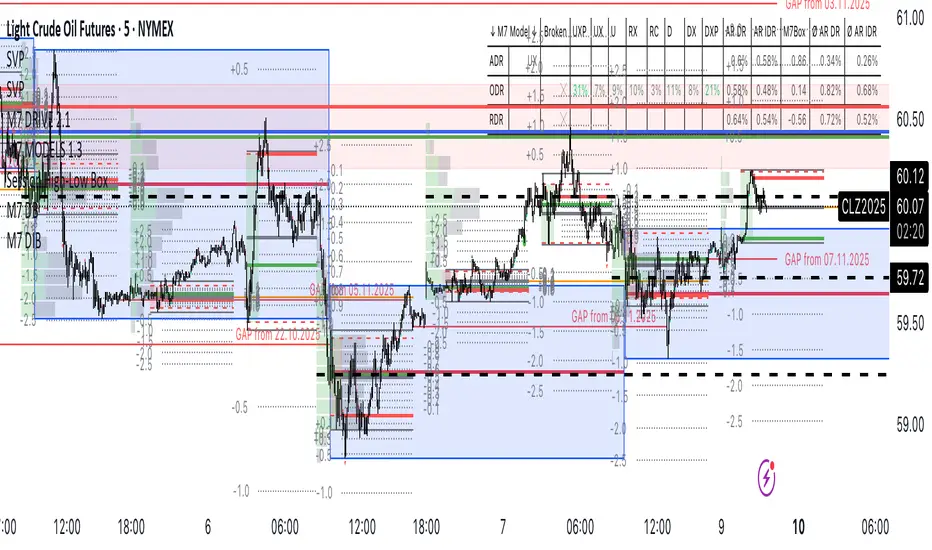
Session High-Low Box, Session High-Low Box Session High-Low Box indicatorSession High-Low BoxSession High-Low BoxSession High-Low BoxSession High-Low BoxSession High-Low BoxSession High-Low BoxSession High-Low BoxSession High-Low BoxSession High-Low BoxSession High-Low BoxSession High-Low BoxSession High-Low BoxSession High-Low BoxSession High-Low BoxSession High-Low BoxSession High-Low BoxSession High-Low BoxSession High-Low BoxSession High-Low BoxSession High-Low BoxSession High-Low BoxSession High-Low Boxwrtvtrvwrtv4v2tr2Session High-Low Box24v2v2Session High-Low BoxPine Script® indicatorby Doncoglione16
TR FVG & Swing High Low FinderTR FVG & Swing Level Finder Overview: The TR FVG & Swing Level Finder is a powerful Pine Script indicator designed for traders who want to identify Fair Value Gaps (FVGs) and Swing Highs/Lows on their charts. This indicator combines two essential technical analysis tools into one, helping traders spot potential areas of support, resistance, and trend reversals. FVGs are price gaps that often act as areas of interest for price to return to, while swing highs and lows help identify key turning points in the market. The indicator is highly customizable, allowing users to adjust colors, limits, and display options to suit their trading style. Key Features: 1: Fair Value Gap (FVG) Detection: - Identifies Bullish FVGs: Occur when the high of two candles ago is lower than the low of the current candle, indicating a potential upward price movement. - Identifies Bearish FVGs: Occur when the low of two candles ago is higher than the high of the current candle, indicating a potential downward price movement. - Displays FVGs as colored boxes on the chart, with customizable border and fill colors based on the timeframe. - Labels each FVG box with the corresponding timeframe (e.g., "1m FVG", "1h FVG", "Daily FVG"). 2: Swing High and Swing Low Detection: - Detects Swing Highs: A 3-candle pattern where the middle candle's high is higher than the highs of the candles on either side. - Detects Swing Lows: A 3-candle pattern where the middle candle's low is lower than the lows of the candles on either side. - Draws a solid black line with 50% opacity at each swing high and low, extending 5 bars to the right for better visibility. - Adds a small Swing High or Swing Low label at the right end of each line, colored according to user-defined settings. 3: Timeframe-Specific FVG Visualization: - FVGs are color-coded based on the chart's timeframe, making it easy to distinguish between FVGs on different timeframes. - Each timeframe has its own fill color for bullish and bearish FVGs, with adjustable transparency for better chart clarity. - A dashed black line is drawn in the middle of each FVG box to highlight the midpoint of the gap. 4: Customizable Display Options: - FVG Limit: Control the maximum number of FVGs displayed on the chart (from 1 to 20). - Extend Options for FVG Boxes: - "None": FVG boxes extend only 2 bars to the right. - "Limited": FVG boxes extend a user-defined number of candles to the right (1 to 100 candles). - "Default": FVG boxes extend 3 bars to the right of the current bar. - Color Customization: - Set border colors for bullish and bearish FVGs. - Adjust fill colors for FVGs on different timeframes (1m, 5m, 15m, 30m, 1h, 4h, Daily, Weekly, Monthly). - Customize the colors of swing high and swing low labels. 5: Performance Optimization: - The indicator only plots FVGs and swings on the last confirmed bar (barstate.islastconfirmedhistory), ensuring efficient performance and reducing chart clutter. - Limits the number of displayed FVGs and swings to the user-defined fvgLimit, keeping the chart clean and focused on the most recent price action. 6: Inputs and Customization: - Number of FVGs to Show (fvgLimit): Set the maximum number of FVGs and swings to display (default: 3, range: 1 to 20). - Bullish FVG Border Color (bullishColor): Choose the border color for bullish FVGs (default: green). - Bearish FVG Border Color (bearishColor): Choose the border color for bearish FVGs (default: red). - Swing High Color (swingHighColor): Set the color for swing high labels (default: blue). - Swing Low Color (swingLowColor): Set the color for swing low labels (default: purple). - Extend Options: - Extend Option (extendOption): Choose how far FVG boxes extend to the right ("None", "Limited", or "Default"; default: "Default"). - Extend Candles (extendCandles): If "Limited" is selected, specify the number of candles to extend FVG boxes (default: 8, range: 1 to 100). - Timeframe-Specific Fill Colors: - Customize fill colors for bullish and bearish FVGs on various timeframes (1m, 5m, 15m, 30m, 1h, 4h, Daily, Weekly, Monthly). - Each fill color has a default transparency (e.g., 93% for most timeframes, 90% for 30m), which can be adjusted as needed. How to Use: 1: Add the Indicator to Your Chart: - Open TradingView, go to the Pine Editor, and paste the script. - Click "Add to Chart" to apply the indicator to your current chart. 2: Adjust Settings: - Open the indicator settings by clicking the gear icon next to the indicator name on your chart. - Modify the inputs to suit your preferences: - Set the number of FVGs and swings to display. - Choose your preferred colors for FVGs and swings. - Adjust the extend options for FVG boxes. 3: Interpret the Indicator: - FVG Boxes: Look for colored boxes on the chart, which represent Fair Value Gaps. Bullish FVGs (green borders by default) suggest potential buying opportunities, while bearish FVGs (red borders by default) suggest potential selling opportunities. The label inside each box indicates the timeframe of the FVG. - Swing Highs and Lows: Identify key turning points with solid black lines (50% opacity) at swing highs and lows. Each line extends 5 bars to the right, with an "SH" (Swing High) or "SL" (Swing Low) label at the end. Swing highs can act as resistance levels, while swing lows can act as support levels. 4: Combine with Your Strategy: - Use FVGs to identify areas where price might return to fill the gap, often acting as support or resistance. - Use swing highs and lows to spot potential trend reversals or to set stop-loss and take-profit levels. - Combine the indicator with other tools (e.g., trendlines, moving averages) for a more comprehensive trading strategy. Notes: - The indicator works on all timeframes, but the appearance of FVGs and swings will vary depending on the chart's timeframe. - For best results, use the indicator on a clean chart to avoid visual clutter, especially if you increase the fvgLimit. - The swing high/low lines are drawn with 50% opacity to ensure they don’t overpower other chart elements, but they are still clearly visible. Author’s Note: This script was developed to help traders identify key price levels with ease. I hope it adds value to your trading! If you have any feedback or suggestions for improvement, feel free to leave a comment. Happy trading!Pine Script® indicatorby traderriazofficialUpdated 88920
Historical High/Lows Statistical Analysis(More Timeframe interval options coming in the future) Indicator Description The Hourly and Weekly High/Low (H/L) Analysis indicator provides a powerful tool for tracking the most frequent high and low points during different periods, specifically on an hourly basis and a weekly basis, broken down by the days of the week (DOTW). This indicator is particularly useful for traders seeking to understand historical behavior and patterns of high/low occurrences across both hourly intervals and weekly days, helping them make more informed decisions based on historical data. With its customizable options, this indicator is versatile and applicable to a variety of trading strategies, ranging from intraday to swing trading. It is designed to meet the needs of both novice and experienced traders. Key Features Hourly High/Low Analysis: Tracks and displays the frequency of hourly high and low occurrences across a user-defined date range. Enables traders to identify which hours of the day are historically more likely to set highs or lows, offering valuable insights into intraday price action. Customizable options for: Hourly session start and end times. 22-hour session support for futures traders. Hourly label formatting (e.g., 12-hour or 24-hour format). Table position, size, and design flexibility. Weekly High/Low Analysis by Day of the Week (DOTW): Captures weekly high and low occurrences for each day of the week. Allows traders to evaluate which days are most likely to produce highs or lows during the week, providing insights into weekly price movement tendencies. Displays the aggregated counts of highs and lows for each day in a clean, customizable table format. Options for hiding specific days (e.g., weekends) and customizing table appearance. User-Friendly Table Display: Both hourly and weekly data are displayed in separate tables, ensuring clarity and non-interference. Tables can be positioned on the chart according to user preferences and are designed to be visually appealing yet highly informative. Customizable Date Range: Users can specify a start and end date for the analysis, allowing them to focus on specific periods of interest. Possible Uses Intraday Traders (Hourly Analysis): Analyze hourly price action to determine which hours are more likely to produce highs or lows. Identify intraday trading opportunities during statistically significant time intervals. Use hourly insights to time entries and exits more effectively. Swing Traders (Weekly DOTW Analysis): Evaluate weekly price patterns by identifying which days of the week are more likely to set highs or lows. Plan trades around days that historically exhibit strong movements or price reversals. Futures and Forex Traders: Use the 22-hour session feature to exclude the CME break or other session-specific gaps from analysis. Combine hourly and DOTW insights to optimize strategies for continuous markets. Data-Driven Trading Strategies: Use historical high/low data to test and refine trading strategies. Quantify market tendencies and evaluate whether observed patterns align with your strategy's assumptions. How the Indicator Works Hourly H/L Analysis: The indicator calculates the highest and lowest prices for each hour in the specified date range. Each hourly high and low occurrence is recorded and aggregated into a table, with counts displayed for all 24 hours. Users can toggle the visibility of empty cells (hours with no high/low occurrences) and adjust the table's design to suit their preferences. Supports both 12-hour (AM/PM) and 24-hour formats. Weekly H/L DOTW Analysis: The indicator tracks the highest and lowest prices for each day of the week during the user-specified date range. Highs and lows are identified for the entire week, and the specific days when they occur are recorded. Counts for each day are aggregated and displayed in a table, with a "Totals" column summarizing the overall occurrences. The analysis resets weekly, ensuring accurate tracking of high/low days. Code Breakdown: Data Aggregation: The script uses arrays to store counts of high/low occurrences for both hourly and weekly intervals. Daily data is fetched using the request.security() function, ensuring consistent results regardless of the chart's timeframe. Weekly Reset Mechanism: Weekly high/low values are reset at the start of a new week (Monday) to ensure accurate weekly tracking. A processing flag ensures that weekly data is counted only once at the end of the week (Sunday). Table Visualization: Tables are created using the table.new() function, with customizable styles and positions. Header rows, data rows, and totals are dynamically populated based on the aggregated data. User Inputs: Customization options include text colors, background colors, table positioning, label formatting, and date ranges. Code Explanation The script is structured into two main sections: Hourly H/L Analysis: This section captures and aggregates high/low occurrences for each hour of the day. The logic is session-aware, allowing users to define custom session times (e.g., 22-hour futures sessions). Data is displayed in a clean table format with hourly labels. Weekly H/L DOTW Analysis: This section tracks weekly highs and lows by day of the week. Highs and lows are identified for each week, and counts are updated only once per week to prevent duplication. A user-friendly table displays the counts for each day of the week, along with totals. Both sections are completely independent of each other to avoid interference. This ensures that enabling or disabling one section does not impact the functionality of the other. Customization Options For Hourly Analysis: Toggle hourly table visibility. Choose session start and end times. Select hourly label format (12-hour or 24-hour). Customize table appearance (colors, position, text size). For Weekly DOTW Analysis: Toggle DOTW table visibility. Choose which days to include (e.g., hide weekends). Customize table appearance (colors, position, text size). Select values format (percentages or occurrences). Conclusion The Hourly and Weekly H/L Analysis indicator is a versatile tool designed to empower traders with data-driven insights into intraday and weekly market tendencies. Its highly customizable design ensures compatibility with various trading styles and instruments, making it an essential addition to any trader's toolkit. With its focus on accuracy, clarity, and customization, this indicator adheres to TradingView's guidelines, ensuring a robust and valuable user experience.Pine Script® indicatorby SpxGh0st1199
Weekly High/Low Day BreakdownThe "Weekly High/Low Day Breakdown" is a tool designed to help identify patterns in market behaviour by analysing the days of the week when weekly highs and lows occur. This indicator calculates the frequency and percentage of weekly highs and lows for each day from Monday to Sunday within the visible range of your chart. Features: Weekly Analysis: Calculates weekly highs and lows based on daily open high and low prices from Monday to Sunday. Day-Specific Breakdown: Tracks which day of the week each weekly high and low occurred. Visible Range Focus: Only considers data within the current visible range of your chart for precise analysis. Interactive Table Display: Presents the results in an easy-to-read table directly on your chart. How It Works: Data Collection: Fetches daily high, low, day of the week, and time data regardless of your chart's timeframe. Uses these daily figures to determine the weekly high and low for each week. Weekly Tracking: Monitors the day of the week when the weekly high and low prices occur. Resets tracking at the end of each week (Sunday). Visible Range Analysis: Only includes weeks that fall entirely within the visible time range of your chart. Ensures that the analysis is relevant to the period you are focusing on. Percentage Calculation: Counts the occurrences of weekly highs and lows for each day. Calculates the percentage based on the total number of weeks in the visible range. Result Display: Generates a table with days of the week as columns and "Weekly High" and "Weekly Low" as rows. Displays the percentage values, indicating how often highs and lows occur on each day. How to Use: Add the Indicator: Apply the "Weekly High/Low Day Breakdown" indicator to your TradingView chart. Adjust Visible Range: Zoom in or out to set the desired visible time range for your analysis. Interpret the Table: Columns: Represent days from Monday to Sunday. "Weekly High" Row: Shows the percentage of times the weekly high occurred on each day. "Weekly Low" Row: Shows the percentage of times the weekly low occurred on each day. Colors: Blue text indicates high percentages, red text indicates low percentages. Example Interpretation: If the table shows a 30% value under "Tuesday" for "Weekly High," it means that in 30% of the weeks within the visible range, the highest price of the week occurred on a Tuesday. Similarly, a 40% value under "Friday" for "Weekly Low" indicates that 40% of the weekly lows happened on a Friday.Pine Script® indicatorby aussiemcbull44
Important High/Low (Manual DateTime Picker + Strong BOS) v2.5📐 Important High / Low(结构趋势指标)使用指南 定位一句话 这是一个 “结构派趋势确认 + 关键防守位识别” 的指标 👉 不预测行情 👉 不频繁给信号 👉 只在你定义的趋势里,标出 必须尊重的高点 / 低点 一、这个指标解决什么问题? 在一段趋势中,你真正关心的只有三件事: 趋势是否还成立 哪里是“不能被破”的关键结构位 止损应该放在哪里才是“逻辑止损”而不是情绪止损 本指标通过 结构拐点(Pivot)+ 结构突破(BOS)确认 来回答这三件事。 二、核心设计理念(非常重要) 1️⃣ 重要低点 > 次要低点 不是每个低点都重要 只有“低点 → 后续出现强势突破并创新高” 才会被确认成 重要低点 2️⃣ 上涨趋势里,只允许重要低点 不会在上涨趋势里画“重要高点” 下跌趋势同理 3️⃣ 所有重要点,都是事后确认 这是优点,不是缺点 它保证: 被画出来的点,一定“已经被市场认可” 三、输入参数详解(逐个解释) 🟦 A. 趋势控制(最重要) Trend mode 选项 含义 Auto(EMA144) 自动趋势(推荐) Manual(Time Window) 手动定义趋势区间 Auto(EMA144)(默认、最常用) 价格在 EMA144 上方 → 视为上涨趋势 价格在 EMA144 下方 → 视为下跌趋势 📌 行为约束: 上涨趋势:只画重要低点 下跌趋势:只画重要高点 适合 90% 日内 / 波段交易 Manual(Time Window) 当你已经主观判断趋势方向时使用。 配套参数: Manual trend direction Up:只允许重要低点 Down:只允许重要高点 Use manual time window? 打开后,才会启用时间段控制 Manual trend START / END (date & time) 用 TradingView 日期时间选择器 直接选 不需要手填时间戳 📌 常见用途: 回测一整段趋势 训练“趋势内只做一个方向” 事件行情 / 主升浪 🟦 B. 结构拐点识别 Pivot strength (L/R) 决定一个高点 / 低点 需要左右各多少根K线确认 周期 推荐值 1–5 分钟 2–3 15–30 分钟 3–5 1 小时 5–7 4 小时+ 7–10 📌 数值越大: 结构越“干净” 但确认越慢 🟦 C. 结构突破(BOS)规则 BOS uses Wick (High/Low) true(推荐): 影线突破就算结构突破 false: 必须收盘价突破(更保守) Must keep making NEW high/low 是否要求“持续创新高 / 新低” 选项 效果 true(强烈推荐) 过滤横盘、假突破 false 信号更多,但更杂 📌 打开后: 每一次 BOS 必须比上一次突破更高 / 更低 才会确认新的重要点 这是“稳”的关键来源之一。 🟦 D. 强势K线过滤(可选) Use strong candle filter on BOS bar? 决定 BOS 那根K线是否必须是强势K线 Body / Range >= K线实体占整根K线的比例 推荐: 0.5:宽松 0.6:平衡(推荐) 0.7:非常严格 Range >= ATR * BOS K线的波动幅度 推荐: 日内:0.8 ~ 1.0 波段:1.0 ~ 1.2 📌 强势过滤适合: 山寨币 假突破多的品种 你想 少而准 🟦 E. 画线与止损体验 Line offset (ATR multiplier) 决定重要高/低点横线 离影线多远 市场 推荐 BTC / ETH 0.1 ~ 0.15 山寨 / 高波动 0.2 ~ 0.3 Short line length (bars) 横线长度 只影响视觉,不影响逻辑 推荐:5 ~ 8 四、不同周期的推荐模板 🔹 日内模板(15m / 30m) Trend mode: Auto(EMA144) Pivot strength: 3 Use wick BOS: true Must make new high/low: true Strong candle filter: true Body/Range: 0.6 ATR multiple: 1.0 Line offset: 0.15 特点: 结构清晰 假突破明显减少 适合顺趋势波段 🔹 波段模板(1h / 4h) Trend mode: Auto(EMA144) Pivot strength: 5–7 Use wick BOS: true Must make new high/low: true Strong candle filter: false 或 true Line offset: 0.2 特点: 重要点很少 但每一个都极具意义 非常适合“结构止损” 五、如何用它做交易(一句话版) 只在趋势方向上进场, 止损永远放在最近的“重要结构点”之外, 一旦被破,承认你的趋势假设是错的。 六、什么时候你“应该退出”,而不是“继续找理由” 多单:重要低点被有效跌破 空单:重要高点被有效突破 📌 这不是指标失效 📌 而是 你的趋势已经结束 📐 Important High / Low User Guide (English Version) One-line description A market structure–based trend confirmation and key defense level indicator Not predictive No frequent signals Only marks critical highs/lows inside a defined trend 1. What problem does this indicator solve? In a trend, traders only care about: Is the trend still valid? Which level must NOT be broken? Where should a logical stop-loss be placed? This indicator answers these questions using Pivot structure + Break of Structure (BOS). 2. Core Concepts 1️⃣ Important Low > Minor Low Not every low is important A low becomes important only if price later breaks structure and makes a new high 2️⃣ In an uptrend, only Important Lows exist No important highs in uptrends Vice versa for downtrends 3️⃣ All important points are confirmed after the fact This is a feature, not a flaw Ensures all marked levels are validated by price action 3. Input Parameters Explained 🟦 A. Trend Control (Most Important) Trend mode Option Meaning Auto(EMA144) Automatic trend (recommended) Manual(Time Window) Manually defined trend Auto(EMA144) Price above EMA144 → Uptrend Price below EMA144 → Downtrend Rules: Uptrend → only Important Lows Downtrend → only Important Highs Manual(Time Window) Used when you already know the trend direction. Related inputs: Manual trend direction Up → only Important Lows Down → only Important Highs Use manual time window? Enables the time window Manual trend START / END (date & time) Select via TradingView date-time picker No timestamp typing required 🟦 B. Pivot Structure Pivot strength (L/R) Defines how many bars on each side confirm a swing point. Timeframe Suggested 1–5m 2–3 15–30m 3–5 1h 5–7 4h+ 7–10 🟦 C. Break of Structure (BOS) BOS uses Wick (High/Low) true → wick break counts (recommended) false → close break only Must keep making NEW high/low Requires continuous higher highs / lower lows. true (strongly recommended) Filters chop and fake breaks Fewer but higher-quality structure points false More signals, more noise 🟦 D. Strong Candle Filter (Optional) Use strong candle filter on BOS bar? Defines whether the BOS candle must be strong. Body / Range >= Body dominance, recommended 0.6 Range >= ATR * Expansion requirement Intraday: 0.8–1.0 Swing: 1.0–1.2 🟦 E. Drawing & Stop-Loss Behavior Line offset (ATR multiplier) Distance between structure line and candle wick. Market Suggested BTC / ETH 0.1–0.15 Altcoins 0.2–0.3 4. Recommended Presets 🔹 Intraday (15m / 30m) Trend mode: Auto(EMA144) Pivot strength: 3 Use wick BOS: true Must make new high/low: true Strong candle filter: true Body/Range: 0.6 ATR multiple: 1.0 Line offset: 0.15 🔹 Swing (1h / 4h) Trend mode: Auto(EMA144) Pivot strength: 5–7 Use wick BOS: true Must make new high/low: true Strong candle filter: optional Line offset: 0.2 5. Trading Principle (One Sentence) Trade with the trend, place stops beyond the most recent important structure level, and exit immediately when that structure is broken. Pine Script® indicatorby jiang117452638531
Unmitigated MTF High Low - Cave Diving Plot IntroductionThe Unmitigated MTF High Low - Cave Diving Plot is a multi-timeframe (MTF) indicator designed for NQ and ES futures traders who want to identify high-probability entry and exit zones based on unmitigated price levels. The "Cave Diving" visualization helps you navigate between support (floor) and resistance (ceiling) zones, while the integrated Strat analysis provides directional context. Who Is This For? Futures traders (NQ, ES) trading during ETH and RTH sessions Scalpers and day traders looking for precise entry/exit levels Traders using The Strat methodology for directional analysis Anyone seeking confluence between price action and key levels Core Concepts 1. Unmitigated Level: An unmitigated level is a price high or low that has been created but not yet tested (touched) by price. These levels act as magnets - price often returns to test them.Key Properties: Resistance (Highs): Price has created a high but hasn't revisited it Support (Lows): Price has created a low but hasn't revisited it Mitigation: When price touches a level, it becomes "mitigated" and loses strength 2. The Cave Diving MetaphorThink of trading as cave diving between two zones: ┌─────────────────────────────────┐ │ CEILING (Upper Band) │ ← 1st & 2nd Unmitigated Highs │ 🟥 Resistance Zone │ ├─────────────────────────────────┤ │ │ │ THE TUNNEL │ ← Price navigates here │ (Trading Channel) │ │ │ ├─────────────────────────────────┤ │ 🟢 Support Zone │ │ FLOOR (Lower Band) │ ← 1st & 2nd Unmitigated Lows └─────────────────────────────────┘ Trading Concept: Ceiling: Formed by the 1st and 2nd most recent unmitigated highs Floor: Formed by the 1st and 2nd most recent unmitigated lows Tunnel: The space between ceiling and floor where price operates Cave Diving: Navigating between these zones for entries and exits 3. Session-Based Age TrackingLevels are tracked by session age: Session: 6:00 PM to 5:00 PM NY time (23-hour window) Age 0: Created in the current session (today) Age 1: Created 1 session ago (yesterday) Age 2+: Older levels (more significant) Why Age Matters: Older unmitigated levels are typically stronger magnets Fresh levels (Age 0) may be weaker and easier to break Age 2+ levels often provide high-probability reversal zones Indicator Components Visual Elements 1. Colored Bands (Cave Zones)Upper Band (Pink/Maroon - 95% transparency) Space between 1st and 2nd unmitigated highs Acts as resistance zone Price often hesitates or reverses here Lower Band (Teal - 95% transparency) Space between 1st and 2nd unmitigated lows Acts as support zone Price often finds buyers here 2. Information Table Located in your chosen corner (default: Bottom Right), the table displays: 5 most recent unmitigated highs (top section) Tunnel row (middle separator) 5 most recent unmitigated lows (bottom section) Reading the TableTable Structure ┌────────┬──────────┬────────┬───────┐ │ Level │ $ │ Points │ Age │ ├────────┼──────────┼────────┼───────┤ │ ↑↑↑↑↑ │ 21,450.25│ +45.30 │ 3 │ ← 5th High (oldest) │ ↑↑↑↑ │ 21,425.50│ +32.75 │ 2 │ ← 4th High │ ↑↑↑ │ 21,410.00│ +25.00 │ 1 │ ← 3rd High │ ↑↑ │ 21,400.75│ +18.50 │ 1 │ ← 2nd High │ ↑ │ 21,395.25│ +12.00 │ 0 │ ← 1st High (newest) ├────────┼──────────┼────────┼───────┤ │ Tunnel │ 🟢 │ Δ 85.50│ 2U │ ← Current State ├────────┼──────────┼────────┼───────┤ │ ↓ │ 21,310.00│ -15.25 │ 0 │ ← 1st Low (newest) │ ↓↓ │ 21,295.50│ -22.75 │ 1 │ ← 2nd Low │ ↓↓↓ │ 21,280.25│ -30.00 │ 1 │ ← 3rd Low │ ↓↓↓↓ │ 21,265.75│ -38.50 │ 2 │ ← 4th Low │ ↓↓↓↓↓ │ 21,250.00│ -45.00 │ 3 │ ← 5th Low (oldest) └────────┴──────────┴────────┴───────┘Column Breakdown Column 1: Level (Arrows) Green arrows (↑): Resistance levels above current price Red arrows (↓): Support levels below current price Arrow count: Indicates recency (1 arrow = newest, 5 arrows = oldest) Why This Matters: More arrows = older level = stronger magnet for price Column 2: $ (Price) Exact price of the unmitigated level Use this for limit orders and stop placement Column 3: Points (Distance) Positive (+) for highs: Points above current price Negative (-) for lows: Points below current price Helps gauge proximity to key levels Trading Application: If you're +2.50 points from resistance, a reversal may be imminent If you're -45.00 points from support, you're far from the floor Column 4: Age (Sessions) Number of full 6pm-5pm sessions the level has survived Age 0: Created today (current session) Age 1+: Created in previous sessions Significance Ladder: Age 0: Weak, may break easily Age 1-2: Medium strength Age 3+: Strong, high-probability reaction zone Tunnel Row (Critical Information)│ Tunnel │ 🟢 │ Δ 85.50│ 2U │ └─┬─┘ └─┬─┘ └──┬──┘ └─┬─┘ │ │ │ │ Label Direction Range Strat 1. Tunnel Label: Identifies the separator row 2. Direction Indicator (🟢/🔴) 🟢 Green Circle: Current 15m bar closed bullish (above previous close) 🔴 Red Circle: Current 15m bar closed bearish (below previous close) 3. Δ (Delta/Range) Distance in points between 1st High and 1st Low Shows the tunnel width (trading range) Example: Δ 85.50 = 85.50 points between ceiling and floor Trading Use: Wide tunnel (>100 points): More room to trade, consider range strategies Narrow tunnel (<50 points): Tight range, expect breakout 4. Strat Pattern 1: Inside bar (consolidation) 2U: 2 Up (bullish directional bar) 2D: 2 Down (bearish directional bar) 3: Outside bar (expansion/volatility) Color Coding: Green: 2U (bullish) Red: 2D (bearish) Yellow: 3 (expansion) Gray: 1 (inside/neutral)Pine Script® indicatorby DeLeBlancUpdated 3360